Our data collection framework
The data collection framework for the Comparative Legislators Database (CLD) relies on the open-collaboration platforms Wikipedia and Wikidata.
We divide our data collection into four steps:
- Entity identification
- Data collection
- Cleaning and verification
- Database integration

1. Entity identification
Our process starts from legislatures' Wikipedia index pages. During the first step of our data collection, we identify and scrape parliamentary members from the index sites to extract the member-specific Wikipedia and Wikidata IDs.
2. Data collection
Once we have extracted the Wikipedia identifiers, we can collect most of the relevant information about the individual legislators from the properties in their Wikidata entry. In some instances, we tackle incomplete data by integrating external data sources.
3. Cleaning and verification
During the third step, we clean and verify our data. This normally means removing noise in values, harmonizing variables within and across legislatures, and performing checks against alternative data sources.
4. Database integration
The final step of our data collection process entails integrating the newly compiled data with the database interface. We assemble the database around the Wikipedia and Wikidata IDs and provide access via the legislatoR package in R.
Getting the files
The first step in this tutorial will be getting the HTML files of the legislatures' index pages to our machines. We recommend you download the cld-dev folder in your machine to maintain a streamlined workflow and follow this tutorial. Project files in RStudio are self-contained working directories with their own workspace, history and source documents. You can read a bit more about Projects in R here. For this tutorials, we assume some familiarity with R programming and the tidyverse.
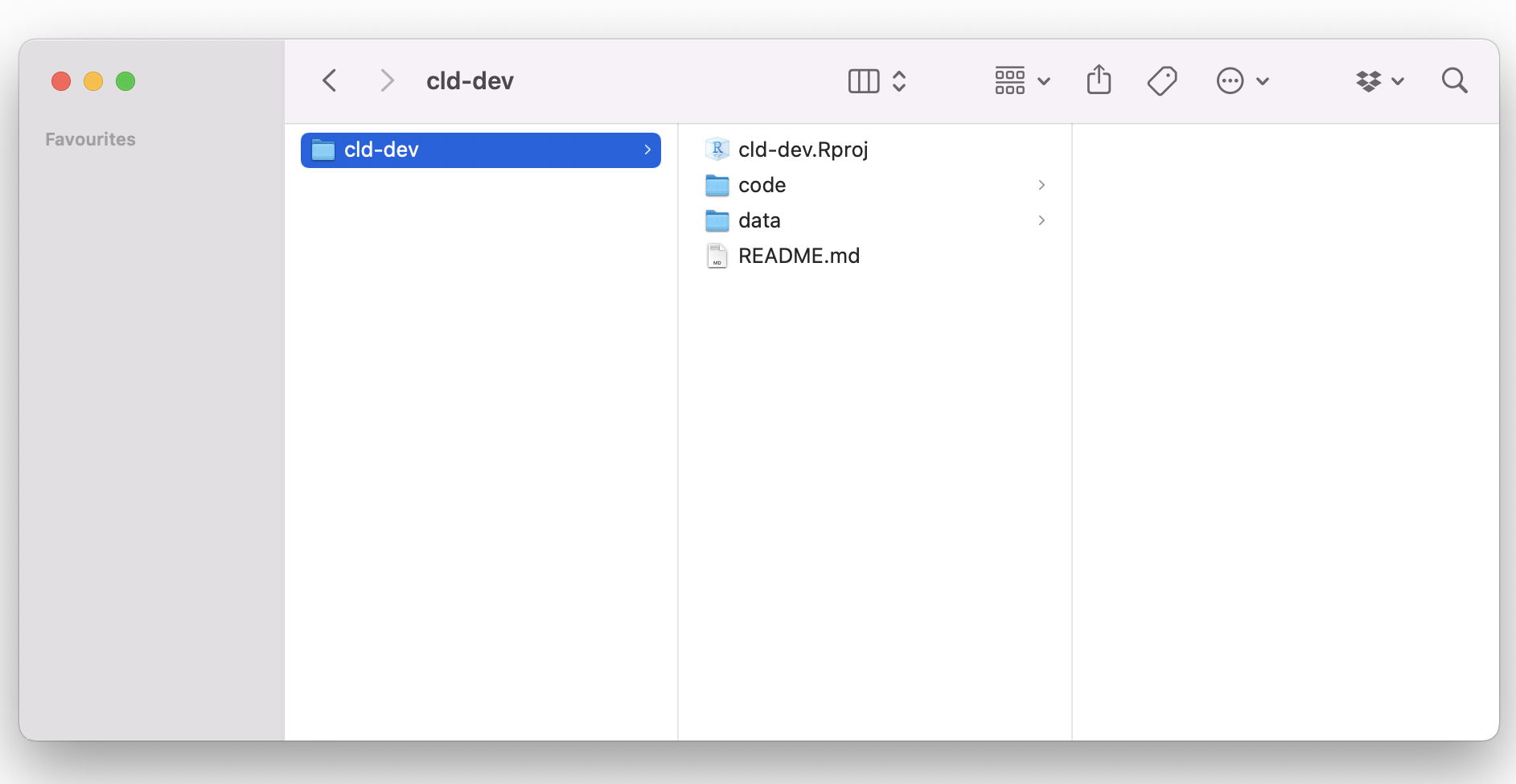
In this tutorial, we will illustrate our process with the Italian Chamber of Deputies, or Camera dei Deputati. This code also lives in the code/italian-chamber folder in our sample R Project. You can just open the cld-web.Rproj file to get your R Session started.
Our process starts from legislatures' Wikipedia index pages, for example: the index containing the members elected during the 1948 Chamber elections. From this page, you can also access the indexes of the succesive elections until 2018.
Once we have identified the index for our legislature of interest, we can download them locally. The idea of working with the local HTMLs is to ensure reproducibility since the Wikipedia entries can change.
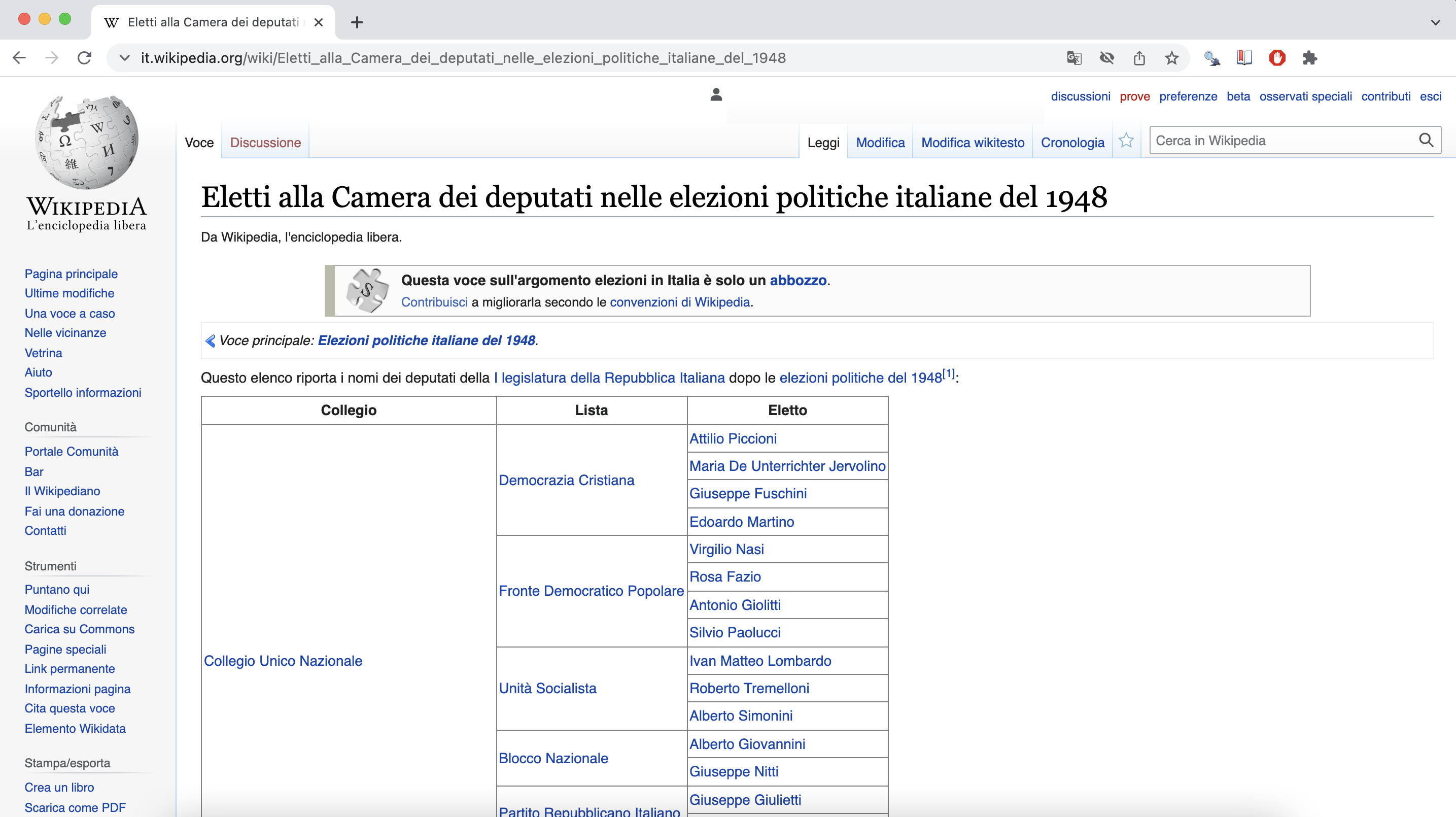
As you will see later, a lot of what we will do during our data collection process will rely on finding patterns. At this stage, we would like to look for patterns in the URLs of the index pages to download them. You could also download them one by one manually into your local folder.
In most cases, as it is with the Camera dei Deputati sites, the URL strings are consistent, for example:
- it.wikipedia.org/wiki/Eletti_alla_Camera_dei_deputati_nelle_elezioni_politiche_italiane_del_1948
- it.wikipedia.org/wiki/Eletti_alla_Camera_dei_deputati_nelle_elezioni_politiche_italiane_del_1953
- it.wikipedia.org/wiki/Eletti_alla_Camera_dei_deputati_nelle_elezioni_politiche_italiane_del_1958
source("code/packages.R")
source("code/functions.R")

# construct list of urls
## chamber of deputies

leg_ses <- c("1948", "1953", "1958", "1963", "1968", "1972", "1976",
"1979", "1983", "1987", "1992", "1994", "1996", "2001",
"2006", "2008", "2013", "2018") # 1st to 18th sessions

url_list <- glue::glue("https://it.wikipedia.org/wiki/Eletti_alla_Camera_dei_deputati_nelle_elezioni_politiche_italiane_del_{leg_ses}")

file_names <- glue::glue("{leg_ses}_chamber_session_ITA.html")

# download pages
folder <- "data/italy_chamber/html/"
dir.create(folder)
for (i in 1:length(url_list)) {
  if (!file.exists(paste0(folder, file_names[i]))) {
    download.file(url_list[i], destfile = paste0(folder, file_names[i])) # , method = "libcurl" might be needed on windows machine
    Sys.sleep(runif(1, 0, 1))
  }
}
Identifying the entities
Once we have downloaded the Wikipedia pages, we want to inspect our files to assemble our entity collection protocol. In this stage, things will revolve around our collector function. Our aim is to generate a nested list comprising all the information that the index page provides for each legislator.
Exploring our HTMLs
Let's take a look at the 1948 Chamber elections index page below. As we can see, there are three data points that we are interested in: Collegio (constituency), Lista (party), and Elleto (name of the legislator). If we scroll through the page, we can also notice that all the information is contained within a single table.
We will work with the rvest package to load our html files into R. This is how the same site looks in our R environment.
parsed_html <- rvest::read_html("data/italy_chamber/html/1948_chamber_session_ITA.html")
parsed_html

## {html_document}
## <html class="client-nojs" lang="it" dir="ltr">
## [1] <head>\n<meta http-equiv="Content-Type" content="text/html; charset=UTF-8">\n<meta charset="UTF-8">\n<title>Eletti alla Camera dei deputati nelle elepolitiche italia ...
## [2] <body class="mediawiki ltr sitedir-ltr mw-hide-empty-elt ns-0 ns-subject mw-editable page-Eletti_alla_Camera_dei_deputati_nelle_elezioni_politiche_italiane_del_1948 rootpa ...Getting familiar with our XPaths
We can inspect the structure of our HTML files through our browser. Let's take the first legislator as an example. We can right click on the name and select Inspect. The code to render the page will appear on a panel in our browser with the attribute specific to the name we clicked on opened by default. In this case, it would be:
<a href="/wiki/Attilio_Piccioni" title="Attilio Piccioni">Attilio Piccioni</a>
As we can see, this <a> tag contains some data we are interested in. That is, the href attribute holds the path to the legislator's Wikipedia page and the title attribute the name of the legislator.
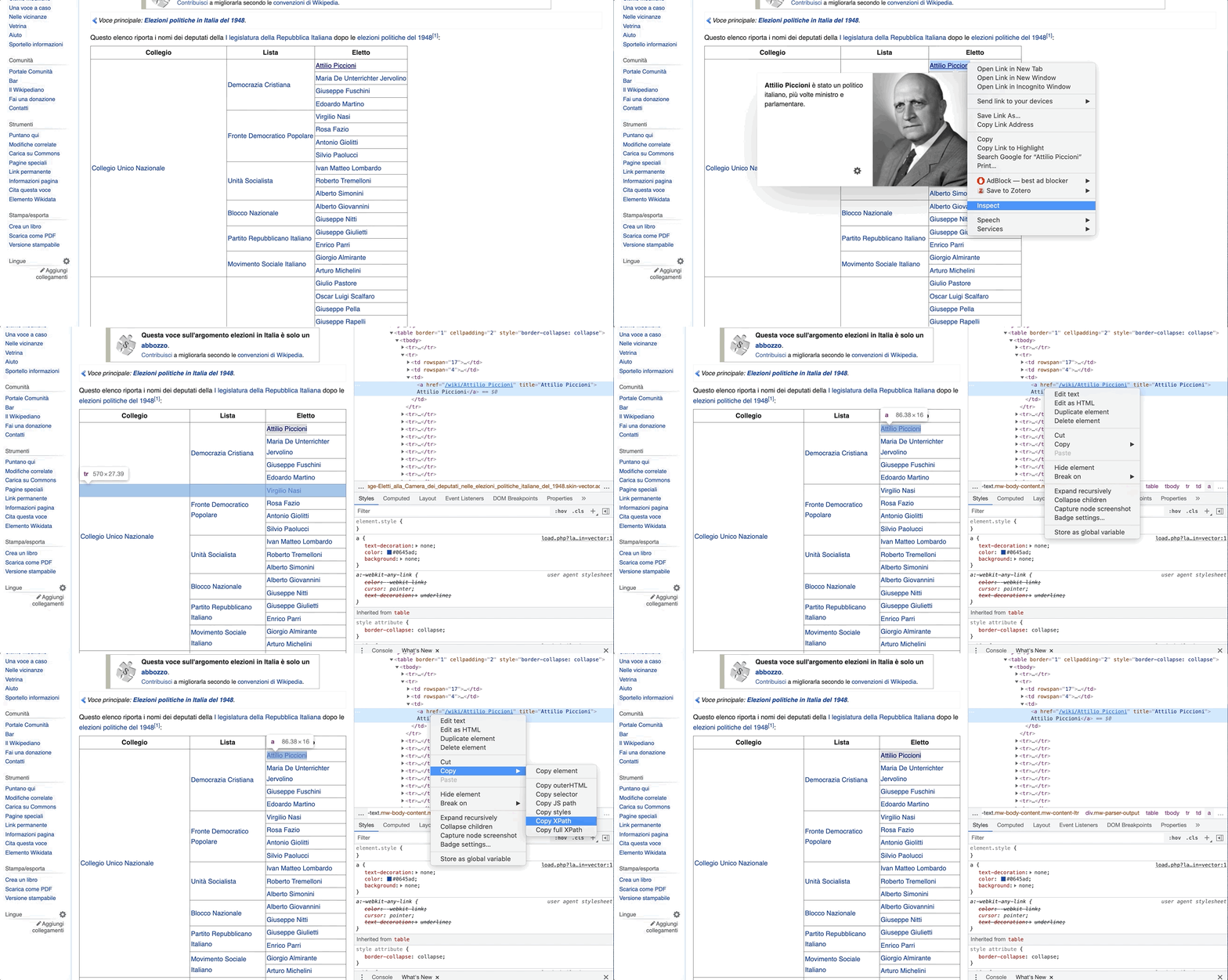
If we further right-clicked on it, then copy + Copy XPath, we would get some extra information that would help us in the parsing of the information.
The output XPath to Attilio Piccioni would be: //*[@id="mw-content-text"]/div[1]/table[2]/tbody/tr[2]/td[3]/a
Though criptic initially, this bit of text will serve two purposes:
a) as a blueprint to help us understand the underlying structure of the file
b) as a selector to aid us in gathering the attributes we require for our database.
To understand the structure, we can work backwards from //*[@id="mw-content-text"]/div[1]/table[2]/tbody/tr[2]/td[3]/a. For example, we will now know that the <a> tag with Attilio Piccioni's information is located in the section where id="mw-content-text" (as is the case with the content of most Wikipedia entries). This also tells us that the tag is the third cell of the second row of the second table of the first section.
Selecting with XPaths in R
In a previous step, we created the parsed_html object, which contained our index page as an {html_document} in R. Now, we will learn how we can leverage this object to extract our data. To work with our HTML documents, we will employ a couple of functions from the rvest package. Previously, we used rvest::read_html(), which as the name suggest helps us load HTML files in out environment. At this stage, we will introduce the rvest::html_nodes() function, which extracts nodes from an HTML document based on some selector argument.
parsed_html <- rvest::read_html("data/italy_chamber/html/1948_chamber_session_ITA.html")
parsed_html

## {html_document}
## <html class="client-nojs" lang="it" dir="ltr">
## [1] <head>\n<meta http-equiv="Content-Type" content="text/html; charset=UTF-8">\n<meta charset="UTF-8">\n<title>Eletti alla Camera dei deputati nelle elepolitiche italia ...
## [2] <body class="mediawiki ltr sitedir-ltr mw-hide-empty-elt ns-0 ns-subject mw-editable page-Eletti_alla_Camera_dei_deputati_nelle_elezioni_politiche_italiane_del_1948 rootpa ...
We can use rvest::html_nodes() to extract Attilio Piccioni's information by feeding the XPath into the functions xpath argument, for example:
piccioni <- parsed_html %>% rvest::html_nodes(xpath = "//*[@id='mw-content-text']/div[1]/table[2]/tbody/tr[2]/td[3]/a")
piccioni

## {xml_nodeset (1)}
## [1] <a href="/wiki/Attilio_Piccioni" title="Attilio Piccioni">Attilio Piccioni</a>
We can also get all <a> sections in the table by deleting the specific row and cell markers from the XPath, for example:
node <- parsed_html %>% rvest::html_nodes(xpath = "//*[@id='mw-content-text']/div[1]/table[2]/tbody/tr/td/a")
node

## {xml_nodeset (772)}
## [1] <a href="/wiki/Collegio_unico" title="Collegio unico">Collegio Unico Nazionale</a>
## [2] <a href="/wiki/Democrazia_Cristiana" title="Democrazia Cristiana">Democrazia Cristiana</a>
## [3] <a href="/wiki/Attilio_Piccioni" title="Attilio Piccioni">Attilio Piccioni</a>
## [4] <a href="/wiki/Maria_De_Unterrichter_Jervolino" title="Maria De Unterrichter Jervolino">Maria De Unterrichter Jervolino</a>
## [5] <a href="/wiki/Giuseppe_Fuschini" title="Giuseppe Fuschini">Giuseppe Fuschini</a>
## [6] <a href="/wiki/Edoardo_Martino" title="Edoardo Martino">Edoardo Martino</a>
## [7] <a href="/wiki/Fronte_Democratico_Popolare" title="Fronte Democratico Popolare">Fronte Democratico Popolare</a>
## [8] <a href="/wiki/Virgilio_Nasi" title="Virgilio Nasi">Virgilio Nasi</a>
## ...
We can further tabulate the attributes of the node object into a workable dataframe, as such:
list_table <- tibble::tibble(
                 url = node %>% rvest::html_attr("href"),
                 name = node %>% rvest::html_text()
              )
list_table

## # A tibble: 772 × 2
## url                                       name
## <chr>                                     <chr>
## 1 /wiki/Collegio_unico                    Collegio Unico Nazionale
## 2 /wiki/Democrazia_Cristiana              Democrazia Cristiana
## 3 /wiki/Attilio_Piccioni                  Attilio Piccioni
## 4 /wiki/Maria_De_Unterrichter_Jervolino   Maria De Unterrichter Jervolino
## 5 /wiki/Giuseppe_Fuschini                 Giuseppe Fuschini
## 6 /wiki/Edoardo_Martino                   Edoardo Martino
## 7 /wiki/Fronte_Democratico_Popolare       Fronte Democratico Popolare
## 8 /wiki/Virgilio_Nasi                     Virgilio Nasi
## 9 /wiki/Rosa_Fazio                        Rosa Fazio
## 10 /wiki/Antonio_Giolitti                 Antonio Giolitti
## # … with 762 more rows
Our new dataframe list_table contains the URLs and text attributes from each <a> node in the table. As you can see, in the previous code chunk, we introduced two additional functions: first) rvest::html_attr() to get specific attributes from a node and second) rvest::html_text() to get the text attached to a node. As you may infer, we could have also extracted the name by getting the title attribute, as such:
tibble::tibble(
    url = node %>% rvest::html_attr("href"),
    name = node %>% rvest::html_attr("title")
)

## # A tibble: 772 × 2
## url                                       name
## <chr>                                     <chr>
## 1 /wiki/Collegio_unico                    Collegio Unico Nazionale
## 2 /wiki/Democrazia_Cristiana              Democrazia Cristiana
## 3 /wiki/Attilio_Piccioni                  Attilio Piccioni
## 4 /wiki/Maria_De_Unterrichter_Jervolino   Maria De Unterrichter Jervolino
## 5 /wiki/Giuseppe_Fuschini                 Giuseppe Fuschini
## 6 /wiki/Edoardo_Martino                   Edoardo Martino
## 7 /wiki/Fronte_Democratico_Popolare       Fronte Democratico Popolare
## 8 /wiki/Virgilio_Nasi                     Virgilio Nasi
## 9 /wiki/Rosa_Fazio                        Rosa Fazio
## 10 /wiki/Antonio_Giolitti                 Antonio Giolitti
## # … with 762 more rows
Getting HTML tables into R
As we have seen, the data we are interested is located in a <table> node of the <div id="mw-content-text"> section. Fortunately, rvest has a means to easily parse an HTML table into a dataframe, that is: rvest::html_table().
parsed_html %>% rvest::html_table()

## [[1]]
## # A tibble: 1 × 2
## X1    X2
## <lgl> <chr>
##   1 NA    Questa voce  sull'argomento elezioni in Italia è solo un abbozzo.Contribuisci a migliorarla secondo le convenzioni di Wikipedia.
##
## [[2]]
## # A tibble: 570 × 3
##    Collegio                 Lista                       Eletto
##    <chr>                    <chr>                       <chr>
##  1 Collegio Unico Nazionale Democrazia Cristiana        Attilio Piccioni
##  2 Collegio Unico Nazionale Democrazia Cristiana        Maria De Unterrichter Jervolino
##  3 Collegio Unico Nazionale Democrazia Cristiana        Giuseppe Fuschini
##  4 Collegio Unico Nazionale Democrazia Cristiana        Edoardo Martino
##  5 Collegio Unico Nazionale Fronte Democratico Popolare Virgilio Nasi
##  6 Collegio Unico Nazionale Fronte Democratico Popolare Rosa Fazio
##  7 Collegio Unico Nazionale Fronte Democratico Popolare Antonio Giolitti
##  8 Collegio Unico Nazionale Fronte Democratico Popolare Silvio Paolucci
##  9 Collegio Unico Nazionale Unità Socialista            Ivan Matteo Lombardo
## 10 Collegio Unico Nazionale Unità Socialista            Roberto Tremelloni
## # … with 560 more rows
##
## [[3]]
## # A tibble: 3 × 2
##   `V · D · M Legislature e parlamentari della Repubblica Italiana` `V · D · M Legislature e parlamentari della Repubblica Italiana`
##   <chr>                                                            <chr>
## 1 Legislature                                                      AC (Eletti) · I · II · III · IV · V · VI · VII · VIII · IX · X · XI · XII · XIII · XIV · XV · XVI · XVII · XVI…
## 2 Deputati                                                         I (Eletti) · II (Eletti) · III (Eletti) · IV (Eletti) · V (Eletti) · VI (Eletti) · VII (Eletti) · VIII (Eletti…
## 3 Senatori                                                         I (Eletti) · II (Eletti) · III (Eletti) · IV (Eletti) · V (Eletti) · VI (Eletti) · VII (Eletti) · VIII (Eletti…
##
## [[4]]
## # A tibble: 1 × 2
##   X1               X2
##   <chr>            <chr>
## 1 Portale Politica Portale Storia d'Italia
This code retrieves all tables within our parsed_html object. As we remember from our exploration of the structure from the XPath, we are interested in the second table. We can extract it like this:
parsed_html %>% rvest::html_table() %>%
      magrittr::extract2(2) # to extract table 2 from the nested list

## # A tibble: 570 × 3
##    Collegio                 Lista                       Eletto
##    <chr>                    <chr>                       <chr>
##  1 Collegio Unico Nazionale Democrazia Cristiana        Attilio Piccioni
##  2 Collegio Unico Nazionale Democrazia Cristiana        Maria De Unterrichter Jervolino
##  3 Collegio Unico Nazionale Democrazia Cristiana        Giuseppe Fuschini
##  4 Collegio Unico Nazionale Democrazia Cristiana        Edoardo Martino
##  5 Collegio Unico Nazionale Fronte Democratico Popolare Virgilio Nasi
##  6 Collegio Unico Nazionale Fronte Democratico Popolare Rosa Fazio
##  7 Collegio Unico Nazionale Fronte Democratico Popolare Antonio Giolitti
##  8 Collegio Unico Nazionale Fronte Democratico Popolare Silvio Paolucci
##  9 Collegio Unico Nazionale Unità Socialista            Ivan Matteo Lombardo
## 10 Collegio Unico Nazionale Unità Socialista            Roberto Tremelloni
## # … with 560 more rows
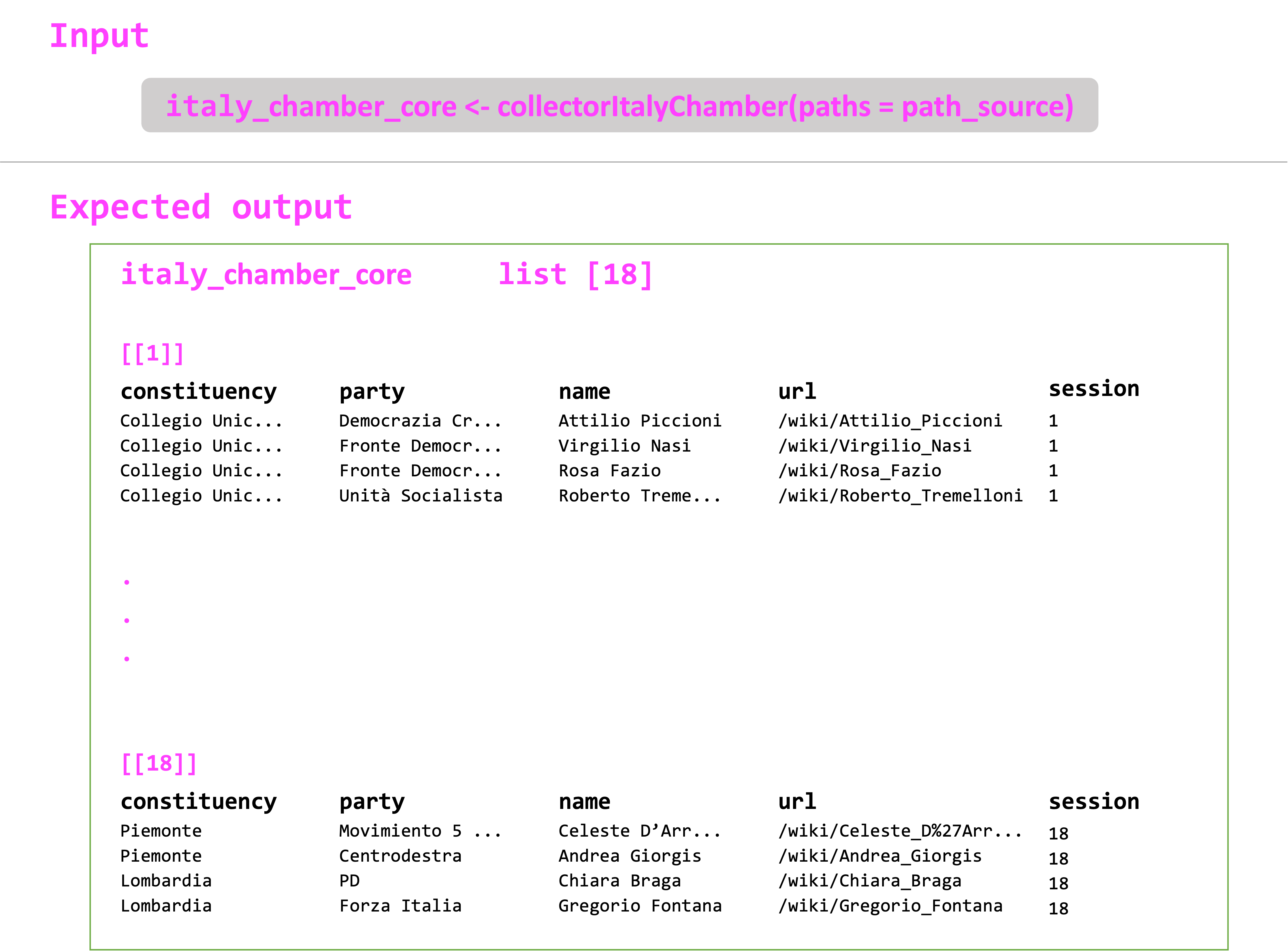
This already looks a lot like the expected output for the legislature's term. If we think back at the first image in this page, we just miss the URL to each legislator's Wikipedia entry and number of the session. We can do this easily by changing the names of the variables with dplyr::rename(), merging these data with the list_table that contained the URLs, and finally creating a new column with the session name:
parsed_html %>% rvest::html_table() %>%
      magrittr::extract2(2) # to extract table 2 from the nested list
      dplyr::rename("name" = "Eletto", "constituency" = "Collegio", "party" = "Lista") %>% # change names
      dplyr::left_join(., list_table) %>% # join current df with tibble of <a> nodes by name
      dplyr::mutate(session = "1")

## Joining, by = "name"
## # A tibble: 572 × 5
## constituency                party                       name                            url                                   session
## <chr>                       <chr>                       <chr>                           <chr>                                 <chr>
## 1 Collegio Unico Nazionale  Democrazia Cristiana        Attilio Piccioni                /wiki/Attilio_Piccioni                1
## 2 Collegio Unico Nazionale  Democrazia Cristiana        Maria De Unterrichter Jervolino /wiki/Maria_De_Unterrichter_Jervolino 1
## 3 Collegio Unico Nazionale  Democrazia Cristiana        Giuseppe Fuschini               /wiki/Giuseppe_Fuschini               1
## 4 Collegio Unico Nazionale  Democrazia Cristiana        Edoardo Martino                 /wiki/Edoardo_Martino                 1
## 5 Collegio Unico Nazionale  Fronte Democratico Popolare Virgilio Nasi                   /wiki/Virgilio_Nasi                   1
## 6 Collegio Unico Nazionale  Fronte Democratico Popolare Rosa Fazio                      /wiki/Rosa_Fazio                      1
## 7 Collegio Unico Nazionale  Fronte Democratico Popolare Antonio Giolitti                /wiki/Antonio_Giolitti                1
## 8 Collegio Unico Nazionale  Fronte Democratico Popolare Silvio Paolucci                 /wiki/Silvio_Paolucci_(politico)      1
## 9 Collegio Unico Nazionale  Unità Socialista            Ivan Matteo Lombardo            /wiki/Ivan_Matteo_Lombardo            1
## 10 Collegio Unico Nazionale Unità Socialista            Roberto Tremelloni              /wiki/Roberto_Tremelloni              1
## # … with 562 more rows
(P.S. we don't need to worry about list_table containing also the information for the constituencies and the parties, since we are joining by name.)
Building our collector
As we said before, a lot of what we will do relies on finding patterns. Our job from here is to inspect all the index pages and find commonalities. Normally, Wikipedians will maintain a constant format for each legislature. From our experience, only small things change from term to term, such as: the number of the table the information is located in, the headers to introduce the information (e.g. Circoscrizione instead or Collegio), or the number of columns in each table. Still, for the most part you can reuse the code and deal with the exeptions within your collector function.
In this case, the code to extract the information from the 1st session of Camera dei Deputati works for the 2, 3, and 5 sessions. To deal with the exceptions, you can embed conditional expressions within the function stating how to extract information from the pages that are formatted differently.
#### ITALY CHAMBER WIKIPEDIA INFORMATION EXTRACTION =============================================

collectorItalyChamber <- function(paths) {
  # import paths to html files in correct order
  source <- paths$files
  # loop through html files
  for (j in 1:length(source)) {
    parsed_html <- rvest::read_html(paths$files[j])

    node <- parsed_html %>% rvest::html_nodes(xpath = "//*[@id='mw-content-text']/div[1]/table/tbody/tr/td/a")

    list_table <- tibble::tibble(url = node %>% rvest::html_attr("href"),
                                 name = node %>% rvest::html_text()
    )

    if (paths$session[j] %in% c(1,2,3,5)) {
      parsed_tab <- parsed_html %>% rvest::html_table() %>% magritrr::extract2(2) %>%
        dplyr::rename("name" = "Eletto") %>%
        dplyr::left_join(., list_table) %>%
        dplyr::select(-contains("Note")) %>%
        dplyr::mutate(session = paths$session[j])
    } else if (paths$session[j] %in% c(12,13,14)) {
      parsed_tab <- bind_rows(parsed_html %>% rvest::html_table() %>% magritrr::extract2(1) %>%
                                dplyr::rename("party" = "Lista", "name" = "Eletto") %>%
                                dplyr::select("Circoscrizione", "party", "name"),
                              parsed_html %>% html_table() %>% magritrr::extract2(2) %>%
                                dplyr::rename("party" = "Partito", "name" = "Eletto") %>%
                                dplyr::select("Circoscrizione", "party", "name")) %>%
        dplyr::mutate(Circoscrizione = stringr::str_remove(Circoscrizione, regex("^[A-Z]+ - "))) %>%
        dplyr::left_join(., list_table) %>%
        dplyr::mutate(session = paths$session[j])
    } else if (paths$session[j] == 18) {
      parsed_tab <- bind_rows(parsed_html %>% rvest::html_table() %>% magritrr::extract2(1) %>%
                                dplyr::rename("party" = "Lista/Coalizione", "name" = "Eletto") %>%
                                dplyr::select("Circoscrizione", "party", "name"),
                              parsed_html %>% html_table() %>% magritrr::extract2(2) %>%
                                dplyr::rename("party" = "Lista", "name" = "Eletto") %>%
                                dplyr::select("Circoscrizione", "party", "name"),
                              parsed_html %>% html_table() %>% magritrr::extract2(4) %>%
                                dplyr::rename("party" = "Lista", "name" = "Eletto") %>%
                                dplyr::select("Circoscrizione", "party", "name"),
                              parsed_html %>% html_table() %>% magritrr::extract2(5) %>%
                                dplyr::rename("Circoscrizione" = "Ripartizione","party" = "Lista", "name" = "Eletto") %>%
                                dplyr::select("Circoscrizione", "party", "name")) %>%
        dplyr::left_join(., list_table) %>%
        dplyr::mutate(session = paths$session[j])
    }
    else if (paths$session[j] %in% c(15,16,17)) {
      parsed_tab <-  parsed_html %>% rvest::html_table() %>% magritrr::extract2(1) %>%
        dplyr::mutate(Circoscrizione = stringr::str_remove(Circoscrizione, regex("^[A-Z]+ - "))) %>%
        dplyr::rename("name" = "Eletto") %>%
        dplyr::left_join(., list_table)  %>%
        dplyr::select(-contains("Note")) %>%
        dplyr::mutate(session = paths$session[j])
    }
    else{
      parsed_tab <-  parsed_html %>% rvest::html_table() %>% magritrr::extract2(1) %>%
        dplyr::rename("name" = "Eletto") %>%
        dplyr::left_join(., list_table)  %>%
        dplyr::select(-contains("Note")) %>%
        dplyr::mutate(session = paths$session[j])
    }

    # collect overall output
    if (j == 1) {
      output <- list(parsed_tab)
    } else {
      output <- c(output,
                  list(parsed_tab))
    }
  }
  return(output)
}
Collecting the data
Once we have created our collector function, we have to follow a series of steps to gather all our data. Things from here will be straightforward. We just need to create a data frame containing the names of the files, the legislative session, and the years. After that, it will be an exercise of replacing strings to match the new legislature.In this tutorial, we will follow-through with the Camera dei Deputati. Still, to make things easier, you can use the code/02-collection-sample script that has clear instructions on which strings to replace to collect the data.
Building the legislature index
At this stage, the HTML files of the legislature should be downloaded locally to the data/italy_chamber/html/ folder.
#### PREPARATIONS =======================================================================

source("code/packages.R")
source("code/functions.R")


#### DOWNLOAD INDEX PAGES =========


leg_ses <- c("1948", "1953", "1958", "1963", "1968", "1972", "1976",
             "1979", "1983", "1987", "1992", "1994", "1996", "2001",
             "2006", "2008", "2013", "2018") # 1st to 18th sessions

url_list <- glue::glue("https://it.wikipedia.org/wiki/Eletti_alla_Camera_dei_deputati_nelle_elezioni_politiche_italiane_del_{leg_ses}")

file_names <- glue::glue("{leg_ses}_chamber_session_ITA.html")

# download pages
folder <- "data/italy_chamber/html/"
dir.create(folder)
for (i in 1:length(url_list)) {
  if (!file.exists(paste0(folder, file_names[i]))) {
    download.file(url_list[i], destfile = paste0(folder, file_names[i])) # , method = "libcurl" might be needed on windows machine
    Sys.sleep(runif(1, 0, 1))
  }
}
An index to guide the handling of exceptions from the collectorItalyChamber() can be built around these files. You can build the table manually and load it into the environment, or create within R.The path_soure table should contain the following elements:
filescontains the local path to each HTML file which contains the data you intend to scrape.sessioncontains the session numbers that the collector function will use for exception handling.yearcontains the start year of the legislative session.
#### DATA COLLECTION ====================================================================

# path to local html files --------------------------------------------------------------
source <- "data/italy_chamber/html" # local html location

# session-specific xpaths ---------------------------------------------------------------
path_source <- tibble(files = mixedsort(list.files(source, full.names = TRUE), decreasing = TRUE),
    session = seq(18,1,-1),
    year = as.numeric(stringr::str_extract(files, stringr::regex("\\d+"))))

path_source

## A tibble: 18 × 3
## files                                                     session year
## <chr>                                                       <dbl> <dbl>
## 1  data/italy_chamber/html/2018_chamber_session_ITA.html       18  2018
## 2  data/italy_chamber/html/2013_chamber_session_ITA.html       17  2013
## 3  data/italy_chamber/html/2008_chamber_session_ITA.html       16  2008
## 4  data/italy_chamber/html/2006_chamber_session_ITA.html       15  2006
## 5  data/italy_chamber/html/2001_chamber_session_ITA.html       14  2001
## 6  data/italy_chamber/html/1996_chamber_session_ITA.html       13  1996
## 7  data/italy_chamber/html/1994_chamber_session_ITA.html       12  1994
## 8  data/italy_chamber/html/1992_chamber_session_ITA.html       11  1992
## 9  data/italy_chamber/html/1987_chamber_session_ITA.html       10  1987
## 10 data/italy_chamber/html/1983_chamber_session_ITA.html       9  1983
## 11 data/italy_chamber/html/1979_chamber_session_ITA.html       8  1979
## 12 data/italy_chamber/html/1976_chamber_session_ITA.html       7  1976
## 13 data/italy_chamber/html/1972_chamber_session_ITA.html       6  1972
## 14 data/italy_chamber/html/1968_chamber_session_ITA.html       5  1968
## 15 data/italy_chamber/html/1963_chamber_session_ITA.html       4  1963
## 16 data/italy_chamber/html/1958_chamber_session_ITA.html       3  1958
## 17 data/italy_chamber/html/1953_chamber_session_ITA.html       2  1953
## 18 data/italy_chamber/html/1948_chamber_session_ITA.html       1  1948
Using the collectorItalyChamber() function
In the previous section, we built the collector function. We leveraged the patterns in the different legislative index pages to create the instructions to parse the entities. The code will iterate across pages with a similar structure based on the legislative session, while handling differences between them.
The collectorItalyChamber() function expectes a single argument paths, the legislature index (i.e., paths_source), which will provide the HTML source to extract the nodes and gather the expected output for all the 18 legislative terms of the Camera dei Deputati. The function renders a set of nested lists containing the tables with the constituency, political party, name, and Wikipedia URL of each legislator for each session.
# retrieve basic data from Wikipedia tables ---------------------------------------------
italy_chamber_core <- collectorItalyChamber(paths = path_source) %>%
  purrr::map(magrittr::set_colnames, c("constituency", "party", "name", "url", "session"))

italy_chamber_core

## [[1]]
## A tibble: 704 × 5
##    constituency party              name                        url                                     session
##    <chr>        <chr>              <chr>                       <chr>                                   <dbl>
##  1 Piemonte 1   Centrosinistra     Andrea Giorgis              /wiki/Andrea_Giorgis                    18
##  2 Piemonte 1   Centrodestra       Roberto Rosso               /wiki/Roberto_Rosso_(politico_196…      18
##  3 Piemonte 1   Centrodestra       Augusta Montaruli           /wiki/Augusta_Montaruli                 18
##  4 Piemonte 1   Centrosinistra     Stefano Lepri               /wiki/Stefano_Lepri_(politico)          18
##  5 Piemonte 1   Movimento 5 Stelle Celeste D'Arrando           /wiki/Celeste_D%27Arrando               18
##  6 Piemonte 1   Centrodestra       Alessandro Manuel Benvenuto /wiki/Alessandro_Manuel_Benvenuto       18
##  7 Piemonte 1   Centrodestra       Carluccio Giacometto        /wiki/Carluccio_Giacometto              18
##  8 Piemonte 1   Centrodestra       Claudia Porchietto          /wiki/Claudia_Porchietto                18
##  9 Piemonte 1   Centrodestra       Claudia Porchietto          /wiki/Claudia_Porchietto                18
## 10 Piemonte 1   Centrodestra       Daniela Ruffino             /wiki/Daniela_Ruffino                   18
### … with 694 more rows
### ℹ Use `print(n = ...)` to see more rows
##
## [[2]]
### A tibble: 635 × 5
##    constituency party                  name              url                           session
##    <chr>        <chr>                  <chr>             <chr>                          <dbl>
##  1 Piemonte 1   Partito Democratico    Cesare Damiano    /wiki/Cesare_Damiano           17
##  2 Piemonte 1   Partito Democratico    Paola Bragantini  /wiki/Paola_Bragantini         17
##  3 Piemonte 1   Partito Democratico    Giacomo Portas    /wiki/Giacomo_Portas           17
##  4 Piemonte 1   Partito Democratico    Francesca Bonomo  /wiki/Francesca_Bonomo         17
##  5 Piemonte 1   Partito Democratico    Edoardo Patriarca /wiki/Edoardo_Patriarca        17
##  6 Piemonte 1   Partito Democratico    Anna Rossomando   /wiki/Anna_Rossomando          17
##  7 Piemonte 1   Partito Democratico    Andrea Giorgis    /wiki/Andrea_Giorgis           17
##  8 Piemonte 1   Partito Democratico    Antonio Boccuzzi  /wiki/Antonio_Boccuzzi         17
##  9 Piemonte 1   Partito Democratico    Silvia Fregolent  /wiki/Silvia_Fregolent         17
## 10 Piemonte 1   Partito Democratico    Umberto D'Ottavio /wiki/Umberto_D%27Ottavio      17
##  # … with 625 more rows
##  # ℹ Use `print(n = ...)` to see more rows
##
##  [[3]]
##  # A tibble: 749 × 5
##     constituency   party                name                   url                               session
##     <chr>          <chr>                <chr>                  <chr>                             <dbl>
##  1  Piemonte 1     Partito Democratico  Piero Fassino          /wiki/Piero_Fassino               16
##  2  Piemonte 1     Partito Democratico  Antonio Boccuzzi       /wiki/Antonio_Boccuzzi            16
##  3  Piemonte 1     Partito Democratico  Anna Rossomando        /wiki/Anna_Rossomando             16
##  4  Piemonte 1     Partito Democratico  Giorgio Merlo          /wiki/Giorgio_Merlo               16
##  5  Piemonte 1     Partito Democratico  Marco Calgaro          /wiki/Marco_Calgaro               16
##  6  Piemonte 1     Partito Democratico  Gianni Vernetti        /wiki/Gianni_Vernetti             16
##  7  Piemonte 1     Partito Democratico  Stefano Esposito       /wiki/Stefano_Esposito            16
##  8  Piemonte 1     Partito Democratico  Giacomo Antonio Portas /wiki/Giacomo_Antonio_Portas      16
##  9  Piemonte 1     Partito Democratico  Mimmo Lucà             /wiki/Mimmo_Luc%C3%A0             16
##  10 Piemonte 1     Popolo della Libertà Guido Crosetto         /wiki/Guido_Crosetto              16
##  # … with 739 more rows
##  # ℹ Use `print(n = ...)` to see more rows
##  …
Extracting and saving the data
Once the italy_chamber_core object has been created. Things are very straightforward. You just need to use a set of provided functions that make the API calls to render the respective output for each of the tables in the database. If you are working with a different legislature, the only changes you will need to perform are:
- replace all strings matching "
italy_chamber" to the respective legislature name. - replace all "
it.wikipedia" strings to match the project containing the legislature.
# retrieve basic data from Wikipedia tables ---------------------------------------------
italy_chamber_core <- collectorItalyChamber(paths = path_source) %>%
  purrr::map(magrittr::set_colnames, c("constituency", "party", "name", "url", "session"))

# retrieve wikipedia page and wikidata ids ----------------------------------------------
italy_chamber_ids <- italy_chamber_core %>%
  purrr::map(mutate, url = paste0("https://it.wikipedia.org", url)) %>%
  purrr::map(wikiIDs, .x$url)

# bind ids to core data and collapse ----------------------------------------------------
italy_chamber <- italy_chamber_ids %>%
  purrr::map2_dfr(bind_cols, .y = italy_chamber_core)
saveRDS(italy_chamber, "data/italy_chamber/italy_chamber")

# retrieve wikipedia revision histories -------------------------------------------------
italy_chamber_history <- italy_chamber %>%
  magrittr::use_series(pageid) %>%
  unique %>%
  purrr::map_dfr(wikiHist, project = "it.wikipedia")
saveRDS(italy_chamber_history, "data/italy_chamber/italy_chamber_history")

# retrieve undirected wikipedia urls/titles ---------------------------------------------
italy_chamber_title <- italy_chamber %>%
  magrittr::use_series(pageid) %>%
  unique %>%
  undirectedTitle(project = "it.wikipedia")
saveRDS(italy_chamber_title, "data/italy_chamber/italy_chamber_title")

# retrieve wikipedia user traffic -------------------------------------------------------
italy_chamber_traffic <- italy_chamber_title %>%
  wikiTrafficNew(project = rep("it", dim(italy_chamber_title)[1]))
saveRDS(italy_chamber_traffic, "data/italy_chamber/italy_chamber_traffic")

# retrieve Wikidata entities ------------------------------------------------------------
italy_chamber_entities <- italy_chamber %>%
  magrittr::use_series(wikidataid) %>%
  unique %>%
  WikidataR::get_item()
saveRDS(italy_chamber_entities, "data/italy_chamber/italy_chamber_entities")

# retrieve legislator's sex -------------------------------------------------------------
italy_chamber_sex <- italy_chamber %>%
  magrittr::use_series(wikidataid) %>%
  unique %>%
  wikiData(entity = italy_chamber_entities,
           property = "P21") %>%
  dplyr::mutate(sex = dplyr::case_when(
    male == TRUE ~ "male",
    female == TRUE ~ "female"
  )) %>%
  dplyr::select(-c(2,3))
saveRDS(italy_chamber_sex, "data/italy_chamber/italy_chamber_sex")

# retrieve legislator's religion --------------------------------------------------------
italy_chamber_religion <- italy_chamber %>%
  magrittr::use_series(wikidataid) %>%
  unique %>%
  wikiData(entity = italy_chamber_entities,
           property = "P140")
saveRDS(italy_chamber_religion, "data/italy_chamber/italy_chamber_religion")

# retrieve and format birth dates -------------------------------------------------------
italy_chamber_birth <-  italy_chamber %>%
  magrittr::use_series(wikidataid) %>%
  unique %>%
  wikiData(entity = italy_chamber_entities, date = TRUE,
           property = "P569") %>%
  mutate(date = stringr::str_replace_all(date, "\\+|T.+", "")) %>%
  mutate(date = stringr::str_replace_all(date, "-00", "-01")) %>%
  mutate(date = as.POSIXct(date, tz = "UTC"))
saveRDS(italy_chamber_birth, "data/italy_chamber/italy_chamber_birth")

# retrieve and format death dates -------------------------------------------------------
italy_chamber_death <-  italy_chamber %>%
  magrittr::use_series(wikidataid) %>%
  unique %>%
  wikiData(entity = italy_chamber_entities, date = TRUE,
           property = "P570") %>%
  mutate(date = stringr::str_replace_all(date, "\\+|T.+", "")) %>%
  mutate(date = stringr::str_replace_all(date, "-00", "-01")) %>%
  mutate(date = as.POSIXct(date, tz = "UTC"))
saveRDS(italy_chamber_death, "data/italy_chamber/italy_chamber_death")

# retrieve and format birth places ------------------------------------------------------
italy_chamber_birthplace <- italy_chamber %>%
  magrittr::use_series(wikidataid) %>%
  unique %>%
  wikiData(entity = italy_chamber_entities, location = TRUE,
           property = "P19") %>%
  mutate(lat = round(lat, digit = 5),
         lon = round(lon, digit = 5)) %>%
  mutate(birthplace = stringr::str_c(lat, ",", lon)) %>%
  dplyr::select(wikidataid, birthplace)
saveRDS(italy_chamber_birthplace, "data/italy_chamber/italy_chamber_birthplace")

# retrieve and format death places ------------------------------------------------------
italy_chamber_deathplace <- italy_chamber %>%
  magrittr::use_series(wikidataid) %>%
  unique %>%
  wikiData(entity = italy_chamber_entities, location = TRUE,
           property = "P20") %>%
  mutate(lat = round(lat, digit = 5),
         lon = round(lon, digit = 5)) %>%
  mutate(deathplace = stringr::str_c(lat, ",", lon)) %>%
  dplyr::select(wikidataid, deathplace)
saveRDS(italy_chamber_deathplace, "data/italy_chamber/italy_chamber_deathplace")

# retrieve and format social media data -------------------------------------------------
italy_chamber_twitter <- italy_chamber %>%
  magrittr::use_series(wikidataid) %>%
  unique %>%
  wikiData(entity = italy_chamber_entities, serial = TRUE,
           property = "P2002")
italy_chamber_instagram <- italy_chamber %>%
  magrittr::use_series(wikidataid) %>%
  unique %>%
  wikiData(entity = italy_chamber_entities, serial = TRUE,
           property = "P2003")
italy_chamber_facebook <- italy_chamber %>%
  magrittr::use_series(wikidataid) %>%
  unique %>%
  wikiData(entity = italy_chamber_entities, serial = TRUE,
           property = "P2013")
italy_chamber_youtube <- italy_chamber %>%
  magrittr::use_series(wikidataid) %>%
  unique %>%
  wikiData(entity = italy_chamber_entities, serial = TRUE,
           property = "P2397")
italy_chamber_linkedin <- italy_chamber %>%
  magrittr::use_series(wikidataid) %>%
  unique %>%
  wikiData(entity = italy_chamber_entities, serial = TRUE,
           property = "P6634")
italy_chamber_website <- italy_chamber %>%
  magrittr::use_series(wikidataid) %>%
  unique %>%
  wikiData(entity = italy_chamber_entities, serial = TRUE,
           property = "P856")
italy_chamber_social <- list(italy_chamber_twitter, italy_chamber_facebook, italy_chamber_youtube, italy_chamber_instagram,
                             italy_chamber_linkedin, italy_chamber_website) %>%
  purrr::reduce(full_join, by = "wikidataid") %>%
  purrr::set_names("wikidataid", "twitter", "facebook", "youtube",
                   "linkedin", "instagram", "website")
saveRDS(italy_chamber_social, "data/italy_chamber/italy_chamber_social")

# retrieve and format portrait data -----------------------------------------------------
italy_chamber_images <- italy_chamber %>%
  magrittr::use_series(pageid) %>%
  unique %>%
  imageUrl(project = "it.wikipedia") %>%
  faceDetection(api_key = api_key,
                api_secret = api_secret) %>%
  tidyr::drop_na()
saveRDS(italy_chamber_images, "data/italy_chamber/italy_chamber_images")

# retrieve and format ids ---------------------------------------------------------------
italy_chamber_parlid <- italy_chamber %>%
  magrittr::use_series(wikidataid) %>%
  unique %>%
  wikiData(entity = italy_chamber_entities, serial = TRUE,
           property = "P1341") #italian
italy_chamber_gndid <- italy_chamber %>%
  magrittr::use_series(wikidataid) %>%
  unique %>%
  wikiData(entity = italy_chamber_entities, serial = TRUE,
           property = "P227")
italy_chamber_libcon <- italy_chamber %>%
  magrittr::use_series(wikidataid) %>%
  unique %>%
  wikiData(entity = italy_chamber_entities, serial = TRUE,
           property = "P244")
italy_chamber_bnfid <- italy_chamber %>%
  magrittr::use_series(wikidataid) %>%
  unique %>%
  wikiData(entity = italy_chamber_entities, serial = TRUE,
           property = "P268")
italy_chamber_freebase <- italy_chamber %>%
  magrittr::use_series(wikidataid) %>%
  unique %>%
  wikiData(entity = italy_chamber_entities, serial = TRUE,
           property = "P646")
italy_chamber_munzinger <- italy_chamber %>%
  magrittr::use_series(wikidataid) %>%
  unique %>%
  wikiData(entity = italy_chamber_entities, serial = TRUE,
           property = "P1284")
italy_chamber_nndb <- italy_chamber %>%
  magrittr::use_series(wikidataid) %>%
  unique %>%
  wikiData(entity = italy_chamber_entities, serial = TRUE,
           property = "P1263")
italy_chamber_imdb <- italy_chamber %>%
  magrittr::use_series(wikidataid) %>%
  unique %>%
  wikiData(entity = italy_chamber_entities, serial = TRUE,
           property = "P345")
italy_chamber_brittanica <- italy_chamber %>%
  magrittr::use_series(wikidataid) %>%
  unique %>%
  wikiData(entity = italy_chamber_entities, serial = TRUE,
           property = "P1417")
italy_chamber_quora <- italy_chamber %>%
  magrittr::use_series(wikidataid) %>%
  unique %>%
  wikiData(entity = italy_chamber_entities, serial = TRUE,
           property = "P3417")
italy_chamber_google_knowledge_graph <- italy_chamber %>%
  magrittr::use_series(wikidataid) %>%
  unique %>%
  wikiData(entity = italy_chamber_entities, serial = TRUE,
           property = "P2671")
italy_chamber_ids <- list(italy_chamber_parlid, italy_chamber_gndid, italy_chamber_libcon, italy_chamber_bnfid,
                          italy_chamber_freebase, italy_chamber_munzinger, italy_chamber_nndb, italy_chamber_imdb,
                          italy_chamber_brittanica, italy_chamber_quora, italy_chamber_google_knowledge_graph) %>%
  purrr::reduce(full_join, by = "wikidataid") %>%
  purrr::set_names("wikidataid", "parlid", "gndif", "libcon", "bnfid",
                   "freebase", "munzinger", "nndb", "imdb",
                   "brittanica", "quora", "google_knowledge_graph")
saveRDS(italy_chamber_ids, "data/italy_chamber/italy_chamber_ids")

# retrieve and format positions ---------------------------------------------------------
italy_chamber_positions <- italy_chamber %>%
  magrittr::use_series(wikidataid) %>%
  unique %>%
  wikiData(entity = italy_chamber_entities, unique = TRUE,
           property = "P39") %>%
  dplyr::select(-unknown) %>%
  data.table::setcolorder(order(names(.))) %>%
  dplyr::select(wikidataid, everything())
saveRDS(italy_chamber_positions, "data/italy_chamber/italy_chamber_positions")

# retrieve and format occupation --------------------------------------------------------
italy_chamber_occupation <- italy_chamber %>%
  magrittr::use_series(wikidataid) %>%
  unique %>%
  wikiData(entity = italy_chamber_entities, unique = TRUE,
           property = "P106") %>%
  dplyr::select(-unknown) %>%
  data.table::setcolorder(order(names(.))) %>%
  dplyr::select(wikidataid, everything())
saveRDS(italy_chamber_occupation, "data/italy_chamber/italy_chamber_occupation")